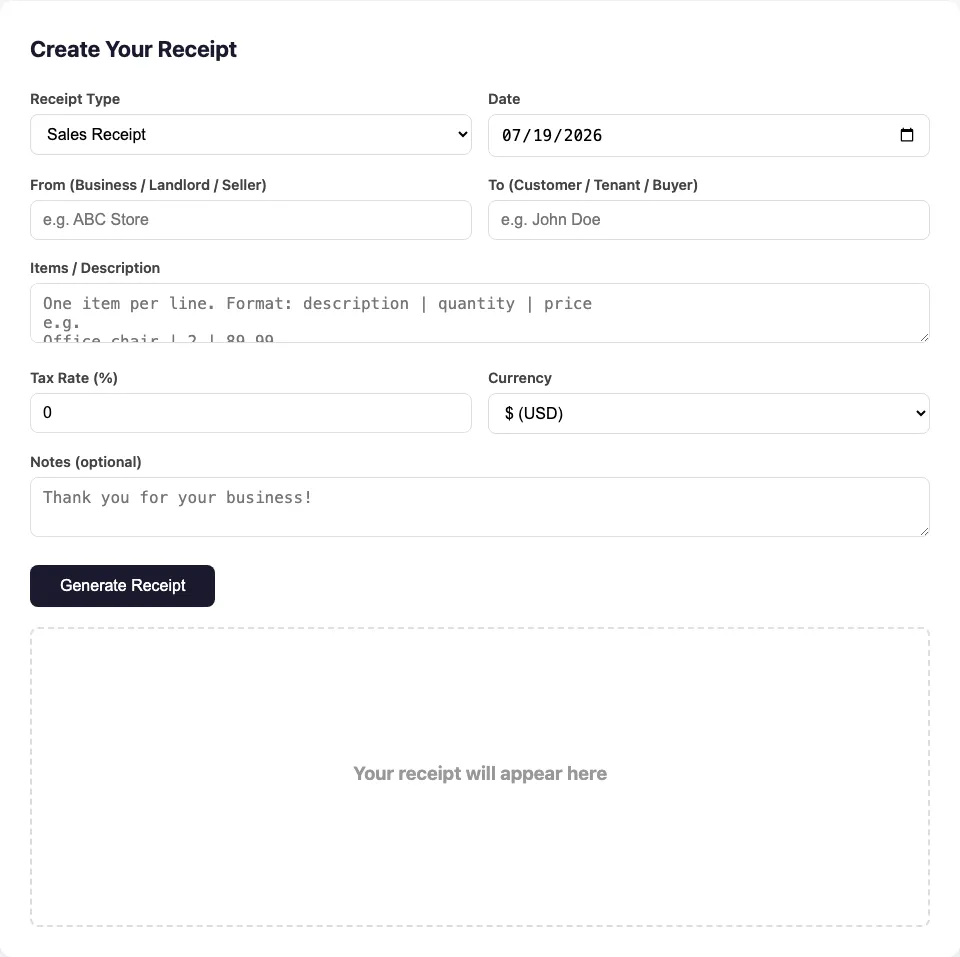
Create Your Receipt
Your receipt will appear here
More Receipt Tools
Gas Receipt
Create a receipt for gas purchases
Rent Receipt
Generate rent payment receipts
Payment Receipt
Create payment confirmation receipts
Restaurant Receipt
Make restaurant dining receipts
Sales Receipt
Generate sales transaction receipts
Donation Receipt
Create charitable contribution receipts
Cash Receipt
Generate cash transaction receipts
Receipt of Payment
Create payment confirmation receipts
Hotel Receipt
Generate hotel stay receipts
Tax Receipt
Create tax payment receipts
Receipt Maker PDF
Create and download receipt PDFs
No Watermark
Clean receipts without watermark
Common Types of Receipts You Can Create
No matter what kind of receipt you need, this free receipt generator has you covered. Every receipt is created in your browser, previewed instantly, and ready to download as a professional PDF. Here are the most common receipt types our users generate:
- Sales Receipt — A standard receipt for selling goods or services. Perfect for retail stores, online sellers, and freelancers issuing a receipt after every transaction.
- Rent Receipt — Issue a rent payment receipt for tenants. Essential for landlords managing rental properties and keeping a paper trail for lease agreements and tenant disputes.
- Payment Receipt — Confirm that a payment has been received. Useful for contractors, service providers, and invoice-based businesses that need to send a payment receipt to clients.
- Donation Receipt — Create a charitable contribution receipt for donors. Great for nonprofits, churches, and fundraising campaigns that need tax-deductible donation records.
- Cash Receipt — Document cash transactions. Ideal for small businesses, market vendors, and anyone handling cash payments who needs a simple receipt to record the sale.
- Hotel Receipt — Generate an itemized hotel stay receipt. Useful for business travelers submitting expense reports after a trip.
- Tax Receipt — Create a tax-deductible receipt for expenses and donations. Helps with annual tax filing and IRS recordkeeping requirements.
- Gas Receipt — Log fuel purchases for business mileage reimbursement. Perfect for delivery drivers and sales reps tracking vehicle expenses for reimbursement.
All receipts include your business name, customer details, itemized breakdown, tax calculation (optional), and a unique receipt number. Download as PDF or print directly from your browser — no account needed. With this receipt generator, you go from form to PDF in under 30 seconds.
How to Use This Free Receipt Generator
Step 1: Select Your Receipt Type
Choose from sales receipt, rent receipt, payment receipt, donation receipt, or any other type in the dropdown menu. Each type auto-formats the receipt title so you don't need to edit anything.
Step 2: Fill in the Details
Enter the business or individual name, customer details, and itemize your products or services. You can add multiple line items with quantities, unit prices, and optional tax. The preview updates instantly as you type — a key advantage of using an online receipt maker over manual templates.
Step 3: Download as PDF or Print
Once your receipt looks right, click Download PDF to save it as a professional PDF document, or click Print for a hard copy. No registration, no watermark, and no hidden fees. That's the promise of a truly free receipt generator.
Who Needs a Receipt Creator?
Receipts are essential for recordkeeping, expense tracking, and legal compliance. Our receipt creator is designed for a wide range of real-world use cases, from small business owners to independent contractors and property managers. If you've ever needed to issue a receipt quickly without starting a free trial or creating an account, this tool is for you.
- Small business owners — Issue professional sales receipts to customers immediately after a transaction. Keep digital copies for your accounting records. Using a purpose-built receipt generator beats building a template from scratch every time.
- Landlords and property managers — Generate rent receipts for tenants each month. Essential for lease agreements, tenant dispute resolution, and tax deduction proof for property expenses.
- Freelancers and contractors — Provide payment receipts to clients after project completion. Clean, professional, and ready to email as PDF. A receipt generator saves you the hassle of formatting each one manually.
- Nonprofits and churches — Create donation receipts for tax-deductible contributions. Include the organization name, donor details, and contribution amount. Maintaining accurate donation records is critical for IRS compliance.
- Delivery drivers and sales reps — Log gas receipts and mileage-related expenses for reimbursement. Export as PDF for monthly expense reports. The IRS recommends keeping detailed records of all business-related expenses — our receipt maker helps you do exactly that.
- Travelers and business trip planners — Generate hotel receipts for expense reporting and reimbursement claims after a business trip. An itemized receipt from this generator includes everything your finance team needs.
- Market vendors and cash businesses — Document daily cash transactions with itemized cash receipts. Keep a clean paper trail for tax season without paying for expensive accounting software.
Unlike paid tools, our free receipt generator has no limits — create as many receipts as you need, for any purpose, completely free. There are no daily caps, no premium features locked behind a paywall, and no watermark on your downloads.
Why Use an Online Receipt Maker Instead of DIY Templates?
You could build a receipt template in Word or Google Docs, but an online receipt maker is faster and more reliable. The receipt number is auto-generated, the date defaults to today, the currency and tax rate are one-click selections, and the item table formats itself. No formatting headaches, no broken layouts when you print, and no manual math errors in the totals column. With a purpose-built receipt generator, you go from blank page to downloadable PDF in under 30 seconds.
Moreover, many free template sites include hidden watermarks, expire after a trial period, or limit how many receipts you can create. Our tool has none of these restrictions. It's a free receipt generator in the truest sense: use it as often as you like, for any type of receipt, for as long as you need.
Do You Need a Receipt for IRS Recordkeeping?
The IRS requires businesses and self-employed individuals to keep records of income and expenses. A well-documented receipt serves as proof of a transaction and can support deductions during an audit. Using a reliable receipt generator ensures your receipts include all the necessary fields: date, business name, customer or payer details, itemized amounts, tax breakdown, and a receipt number. The IRS guide on deducting business expenses recommends keeping receipts for any expense you plan to deduct. Our receipt maker helps you stay organized year-round.